
Runtime Flows
End-to-end document, task, chat, and email workflows.
Runtime flows explained visually
These raster diagrams are generated documentation assets and are paired with exact captions below so the page is readable even when a tiny in-image label is hard to inspect.
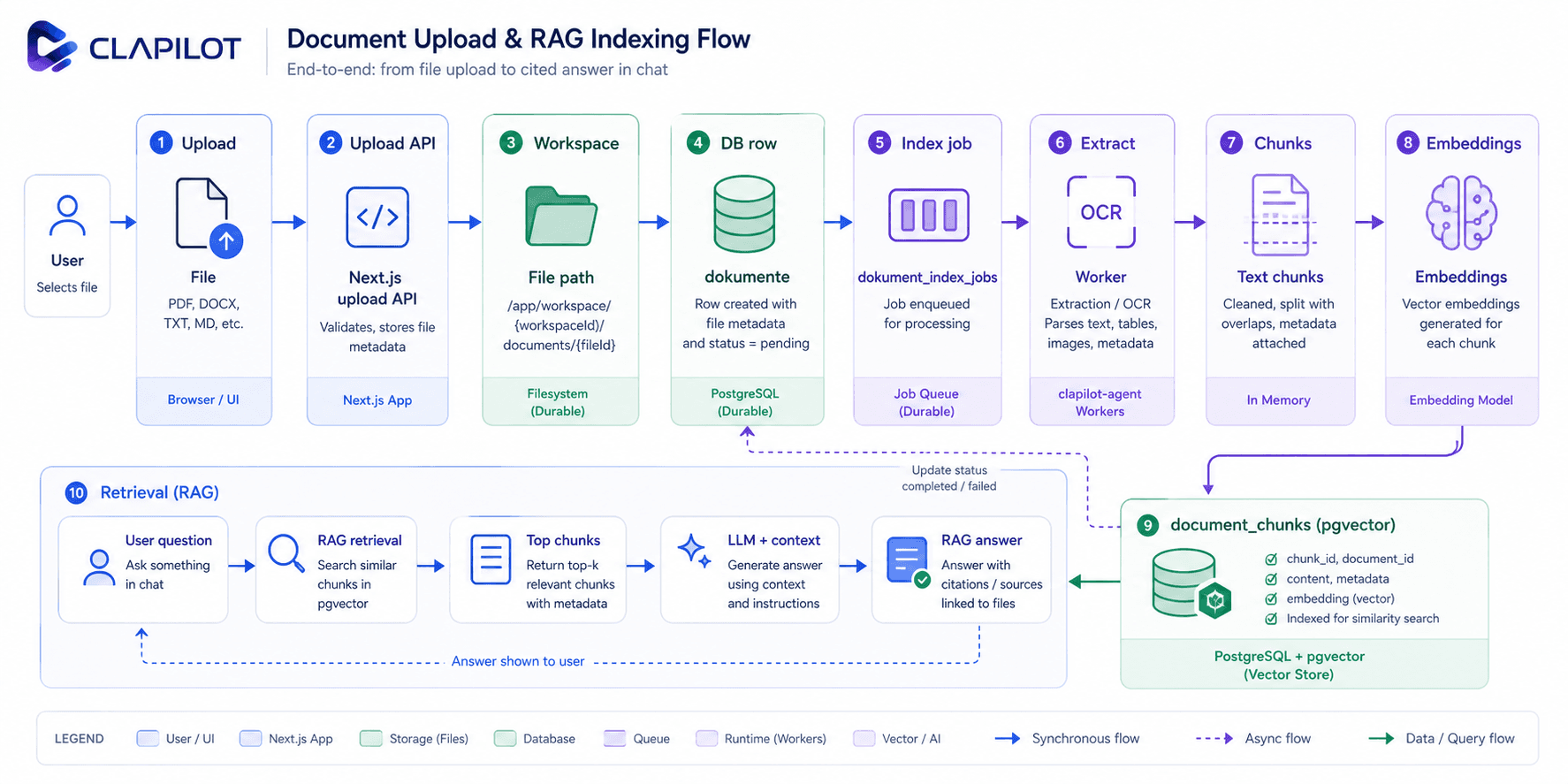
Tracks a document from upload through workspace storage, database rows, indexing jobs, extraction, embeddings, pgvector chunks, and chat retrieval.
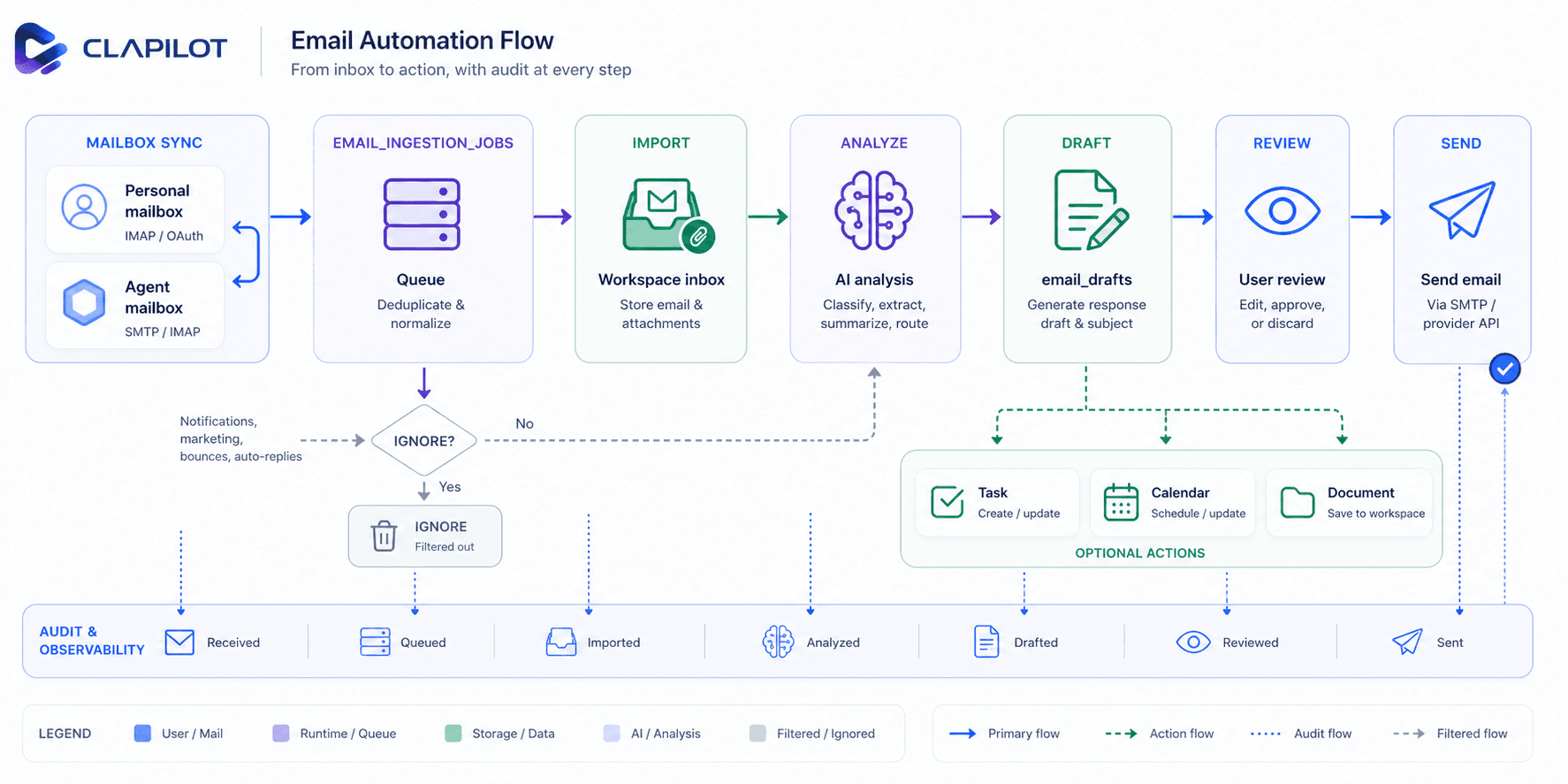
Shows how mailbox sync, ingestion jobs, attachments, AI analysis, drafts, tasks, calendar events, and user review fit together.
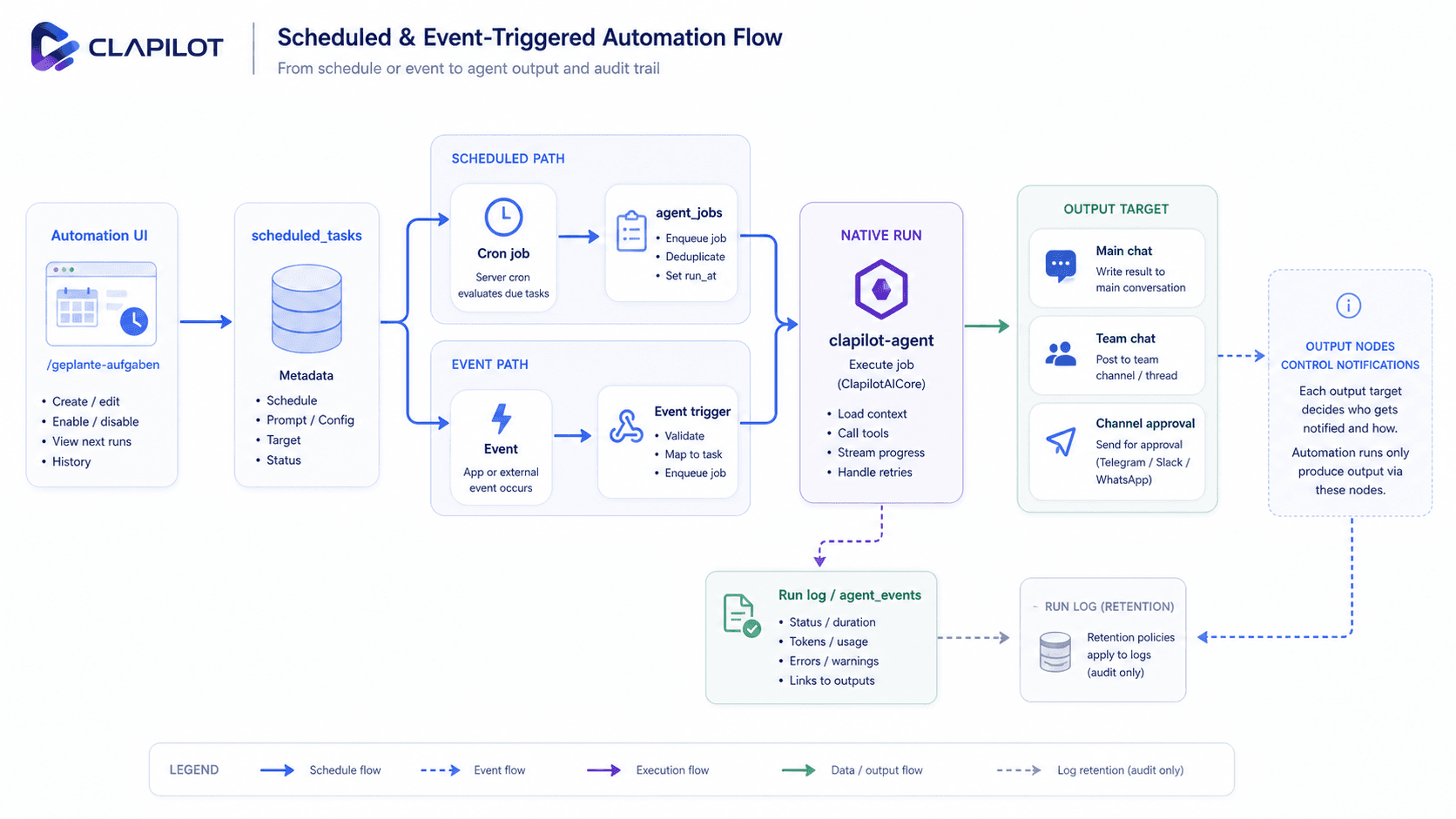
Compares scheduled cron-backed native jobs with app-managed event triggers and shows how both converge into native runs and output targets.
This page explains what happens after a user or external system asks Clapilot to do work. The common pattern is:
- The app records the user action or imported event.
- The relevant context is attached: user, route, document, Mandant, mailbox, channel, or automation target.
- The native runtime receives a run, job, or channel event.
- The runtime uses memory, tools, model routing, and audit logs to produce the visible result.
Use this page when you need to trace an end-to-end behavior rather than a single API handler.
Generate a reply on demand
Web, iOS and macOS email reply composers offer Generate reply, including when the inbox workflow decided no reply was needed. An empty message creates a complete reply from the received email and available Clapilot context; existing text supplies the user's intent and is developed into a complete response. The source language is the default reply language. Generation fills the editor for review and leaves recipients and subject unchanged. Errors preserve the current text; saving and sending remain explicit actions. Chat and live agents use emails_generate_reply for the same workflow.
Document upload
- User uploads file and metadata.
- API resolves target mandant folder.
- File is written to
/app/workspace/mandanten/<mandant>/dokumente/<typ>/. dokumenterow is inserted with normalized relativefile_path.
Inbox automation
- Incoming files are written to
/app/workspace/mandanten/_inbox. - Placeholder rows are inserted in
dokumente. - Trigger marker
.process-nowis written. - On native-runtime installs, the preinstalled
Inbox Document Processingautomation picks up the trigger and runs the classification/follow-up prompt throughclapilot-agent. - After document AI extraction completes in the RAG indexer, the preinstalled
Document Post-Extraction Reviewevent automation receives thenew_documentevent and lets the agent decide whether to create, update, or leave Mandant/customer data unchanged.
Event-triggered automations
/geplante-aufgabencan now persist automations withtrigger_kindset tonew_mail,new_document,new_calendar_entry, orwebhookinstead of a time schedule.- These rows stay in
scheduled_tasks, but they do not create native cron jobs and therefore do not need fake next-run timestamps. - When a matching event is created or imported, Clapilot dispatches the automation by starting a native runtime session directly against the automation’s stable session key.
new_mailautomations can optionally scope themselves toall,personal, oragentmailboxes; dispatch skips mismatched mailbox events.- New mail events are emitted after the mailbox flow has finished AI analysis, so the automation receives summary, match, and action context instead of raw message metadata.
- New document events are emitted after document AI processing completes in the RAG indexer, not immediately at upload/import time.
- Webhook automations store a unique token in
scheduled_tasks.provider_snapshot.webhookTokenand expose/api/automation-webhooks/{token}. Acceptance atomically reserves anagent_runsrow and persists the redacted request envelope inscheduled_task_event_queuebefore returning itsrun_id. GitHub delivery IDs (or a canonical payload hash) deduplicate retries. The native webhook queue reclaims interrupted rows after restart, reuses the reserved run ID, and records termination status,error_code, timestamps, and a redacted cause. Final automation posts are deduplicated by run ID so recovery publishes a release update once. - The preinstalled
Document Post-Extraction Reviewautomation uses that event to review extracted document context and decide on Mandant/customer mutations via normal Clapilot tools instead of hardcoded indexer logic. - New calendar entry events are emitted by direct calendar creation, Google Calendar sync, and agent-created calendar actions.
- Because event-triggered runs reuse stable native session keys, the run/event log shown in
/geplante-aufgabencontinues to work for both schedule-backed and event-backed automations. - The inbox flow no longer exposes a user-facing PDF mode toggle. Native uploads and the scheduler both use the same direct-document prompt contract.
- The runtime is told to inspect and validate the original files from the shared workspace instead of depending on a pre-extracted fallback transcript.
- The native runtime receives the structured prompt for classification and follow-up.
/api/documents/inboxwakesclapilot-agentthrough/internal/runs. - Document-analysis specialists can be configured under
Settings -> Agent -> Spezialisierte Agentenwith the normal prompt, tool, auth, Core-Memory, and permission-bypass controls. The specialist editor supports both the normal form and a Capability Graph where admins connect the specialist to Skill, grouped Tool, Auth, and Core-Memory nodes that write the same persisted capability allowlists; grouped Tool nodes expose the exact read/write/get/create grants in the inspector. Anew_documentautomation can then bind one of those specialists to a concrete document type or workflow prompt while keeping review/freigabe in the automation prompt where needed.
Chained automation agents and attached skills
- When an automation's
workflow_config_jsoncontains multiple agent nodes, the job runner executes them sequentially as a linear chain (chain order followsagent -> agentedges). - Step 1 runs with the normal automation run message (trigger/event context plus the flat automation prompt) in the automation's session key. Each later step runs in a step-scoped session (
<session_key>:step-<n>) and receives a[Automations-Kette Schritt n/m]message containing the previous agent's output plus that agent node's ownconfig.prompt. - Each step resolves its own specialized agent (
config.specialized_agent_id), model (specialist default_model_ref→ nodeconfig.model→ task model), and attached skills.config.skill_keysare resolved against the installed-skill catalog and injected as anInjected skills:block into that step's extra system prompt — additively, independent of whether the step runs as the default agent or a specialized agent. A disabled/deleted specialized agent on any chain step fails the run. - Every step gets destination-specific guidance for its own output bindings, including
never; unbound outputs belong to the final step. Intermediate steps also get a chain-handoff prompt: the final reply is forwarded to the next agent without a manual channel handoff. An explicitly requested authorized post to anerrorsorneverdestination bound to the current step remains possible even when another output usesalways; unbound or other-step output requests are deferred instead of posted early. Same-destination automatic delivery still avoids a duplicate post. - Output nodes wired from a specific agent node deliver that step's result with the output's own
notify_result_mode; outputs without an incoming agent edge (and legacy flat notify targets) deliver the final chain result. A failed step aborts the chain and follows the normal automation failure/notification path; the job'slast_run_idpoints at the final executed step.
Scheduled tasks
UI entry point: /geplante-aufgaben, with a top segmented control for Automationen and Agenten.
- Clapilot creates or syncs scheduled-task metadata rows in
scheduled_tasks. - The
/geplante-aufgabenUI opens create and detail/edit flows inline in the list instead of a dialog: clicking a row expands an animated editor panel underneath it, the+button animates in a synthetic "Neue Automation" row with the same editor below it, and a per-row run-log button expands the run log inline under the row. The editor is a single merged surface — the graphical workflow editor plus only the fields the graph does not cover (title, generated profile image, task type on create, and the admin-only execution scope); prompt, agent, model, target, notify mode, trigger, and schedule are edited exclusively through the graph nodes. The former client/Mandant assignment has been removed from the automation editor entirely. It still reads and writes the samescheduled_taskscontract. Switching to theAgentensegment renders the specialist overview from/api/specialized-agents/overview; the old/modules/agentsroute redirects to that segment. - On native-runtime installs, Clapilot also ensures the default system automations exist:
Agent Inbox Sync,User Inbox Sync,Inbox Document Processing,Document Post-Extraction Queue,Learning Curator, andMemory Dreaming.User Inbox Syncdefaults to a 10 minute interval. The document queue is the durable, sequential execution path for the protectednew_documentpost-extraction review and backs off globally on verified provider limits. - These preinstalled system automations can be paused or resumed from
/geplante-aufgaben, but they cannot be deleted from the app UI or API. - Runtime execution is delegated through the native
clapilot-agentruntime client. - New tasks created in Clapilot become native jobs immediately for schedule-based automations; direct event-triggered automations stay app-managed but use the same
scheduled_tasksmetadata row. - When
scheduled_tasks.specialized_agent_idis set, both native schedule execution and app-managed event execution resolve that specialist at run time, switch to the specialist session key, and inherit the specialist's current prompt, injected skills, model, tool/auth scope, and history policy instead of the generic main-agent automation path. Queued document revisions use the same specialist envelope. - The native runtime stores jobs in
agent_jobs, executes due runs internally, and keepsscheduled_taskssynchronized through the runtime adapter. Scheduled-task reads also overlay currentagent_jobsstate directly so protected system automation rows show the real next/last run even when the metadata mirror is stale. - Native system jobs that do not create a full
agent_runsconversation still write compactagent_eventsentries (job.completedorjob.failed) under their session key, so the/geplante-aufgabenrun log can show operational history for mailbox sync, inbox processing, and Learning curation. The detail loader also checks the legacynative-job:<jobId>session key when a job has moved to a stable Clapilot automation key. - Every automation now carries one assigned target session/channel via
notify_target_json, with user-owned rows defaulting tomain_session, optionalmain_session.sessionIdtargeting a concrete web chat for self wake-ups,team_chat.roomIdtargeting a selected Teamchat channel/group, and system-owned rows defaulting toteam_chat(#general). - Output nodes in
workflow_configare the notification contract for both model-backed and native system automations. Adding an output node enables result delivery according to that node'snotify_result_mode; removing all output nodes from a saved workflow makes the automation run-log-only. The default graph forUser Inbox Syncintentionally has no output node. - Automation runs receive per-destination success-delivery instructions:
alwaysuses the final reply,informationalrequiresAUTOMATION_NOTIFY:, anderrors/neverrequire an explicitly requested authorized manual post for successful results. An output at one destination does not determine another destination's policy. Native document/webhook queues use their stored workflow output overrides too. Without a workflow, the assigned target remains the implicit destination. This is now enforced, not just instructed: when the agent itself posts to the assignedchannel_approvaltarget during the run viachannel_send_message, the runtime detects that send (matched on the resolved approval id) and suppresses the duplicate final-reply auto-delivery to the same target, so the user receives the task work once instead of the work plus a separate confirmation/summary. The same dedupe applies to live channel runs against the originating thread. main_sessiondelivery resolves deterministically: it targets the user's stable main session (or an explicit pinnedmain_session.sessionId) and never promotes a most-recently-active session as a recency guess. A pinnedsessionIdthat no longer exists fails loud into the run log instead of silently delivering into a different, guessed session.- Automation control directives are runtime-only protocol. The native runtime parses
AUTOMATION_NOTIFY:,AUTOMATION_SILENT, and relatedAUTOMATION_*sentinels from the raw final reply, strips them before writingagent_runs.output_text, and applies the same sanitization before manual/alwaysand automatic/informationaldelivery. Sentinel-only runs persist no visible output and are not delivered; failed runs still emit assistant-origin automation messages into configured output targets. A delivered final answer that is an explicit failure report (warning symbol plus failure wording on its first line) additionally marks the runfailedwithautomation_reported_failureinstead of settling as a successful run. Local filesystem paths in delivered Team Chat text are reduced to their file name rather than removed, so diagnostic references such as snapshot files remain visible. - One-shot automations (
schedule_mode = 'once') are cleaned up after they have run. The native runtime sweeps them on its job poll: a job whose result was delivered, that carries no error, is not dead-lettered or retrying, and has not been re-armed is deleted once its last run is older than the retention window (CLAPILOT_AGENT_COMPLETED_ONE_SHOT_RETENTION_MS, default one hour). Thescheduled_tasksrow then disappears through the normal provider reconciliation insrc/lib/scheduled-tasks.ts, so finished one-time automations leave the list on their own. Failed one-shots are kept so the failure stays inspectable, andagent_runshistory is unaffected. Both automation editors state this under the Einmalig schedule option. - Clapilot keeps DB metadata as the stable app contract so the provider can be replaced without changing the page or live-agent tool surface.
Blueprints
/geplante-aufgaben offers a compact From blueprint gallery as an onboarding layer over the normal create flow. A user selects one of seven curated blueprints, reviews its prefilled typed slots and schedule summary, can rename the task, and creates a normal editable scheduled task. The localized prompt is stored on that task; blueprints add no new execution or persistence semantics.
The catalog contains:
- Morning briefing: weekday calendar, open/overdue tasks, important unread email, and optional configured news. Calendar rows come from
calendar_list_events, which consolidates provider duplicates and semantically identical deadline entries (same invoice/document reference less than 24 hours apart, or identical title without a conflicting reference or amount at the same start) so one payment deadline is listed once even when e-mail automation, document analysis, and an agent each created an entry. - Nightly inbox digest: today's new email grouped by importance with suggested next actions.
- Document inbox sweep: periodic review of unprocessed inbox documents.
- Weekly client report: open tasks, deadlines, and stalled items across Mandanten/customers.
- News clipping digest: configured news topics summarized daily.
- Email follow-up reminder: sent messages awaiting a reply beyond the configured number of days.
- Calendar conflict check: a 14-day look-ahead for overlaps and back-to-back events across locations.
The native agent has the same catalog through scheduled_tasks_blueprints_list and creates from it through scheduled_tasks_blueprint_instantiate. Both the UI and agent path reuse src/lib/automation-blueprints.ts and the existing scheduled-task creation service.
Chat streaming and attachments
Detailed request-routing and prompt-assembly diagrams:
- UI captures text input (typed or microphone voice-to-text dictation in supported browsers) and optional attachments.
- Every user has one protected main personal session plus any number of custom sessions. The app defaults into the main session on open, and users can still create custom sessions and set a per-session model override (web and Apple clients). The shared
/team-chatroom keeps its own Angela model override separately from personal sessions. - API persists user message in
chat_nachrichtenwithsession_id. - If
RAG_ENABLED=true, API attempts retrieval and injects document context as a system message, but only when an active Mandant context is present viamandantIdor the current/mandanten/:idroute. - With the native backend enabled, ClapilotAICore also bootstraps session memory from shared workspace prompt files and synchronizes
memory/**/*.mdinto the native recall store before retrieval. - Native memory retrieval uses OpenAI text embeddings for vector recall plus PostgreSQL full-text search for keyword recall; document RAG remains a separate document-centric retrieval layer.
- Memory flush and history compaction never block the foreground request. The native runtime starts the user-visible run from the last completed summary plus a token-budgeted recent-turn tail, then schedules maintenance in the detached post-response pipeline.
- A flush extracts durable facts from completed turns into native recall storage.
- When the session is getting large, the background maintenance pipeline runs a native safeguard compaction pass: older completed turns are summarized into a persisted structured session summary with identifier retention and auditing, while only the recent preserved turn tail remains verbatim. Maintenance is single-flight per session and coalesces a busy session to its latest pending pass.
- Future native runs inject the latest completed compaction summary back into the prompt and replay only turns after
compactedThroughRunCount. If a background pass is still running, the current request remains safe because recent-turn replay is independently capped and fitted to the selected model's token budget. - For the current request, the session layer still trims the replayed recent tail to fit the remaining budget and may drop approved-learning or retrieved-memory context before dropping recent turns.
- Native runtime now adds a fixed runtime-owned system prompt describing tooling, safety, workspace, memory, docs, current time, and runtime/session identity before the shared bootstrap files, retrieved memory, retrieved structured knowledge graph context, and approved learned context are appended.
- Native execution no longer stops at a single completion call.
clapilot-agentcan now run an iterative agent loop with internal toolsexec_command,package_install,context_search,context_get,memory_search,memory_get,memory_grep,memory_describe,memory_expand,knowledge_search,knowledge_get_entity,knowledge_neighbors,knowledge_explain_claim,learning_search,learning_get_object, andsession_statusacross OpenAI, Anthropic, and OpenAI-compatible backends. - Stored
codex_auth_jsonis synchronized into.clapilotaicore/.codex/auth.json. When standard native chat selects anOpenAI-Codexmodel, it uses the Codex bridge instead of direct OpenAI/chat/completionsor/responsescalls. That bridge now also registers a Clapilot MCP stdio server inside the private CodexCODEX_HOME, so Codex-backed GPT runs can call Clapilot-native app tools when they pass the currentsession_key. Interactive Codex app-server sessions resolve Codex service tier per model from Codex-auth provider metadata (modelServiceTiers), withGlobalfalling back toCLAPILOT_AGENT_CODEX_SERVICE_TIERonly when that environment variable is set. The Codex settings picker asks the installed Codex app-server formodel/listand uses itsadditionalSpeedTiersto show per-model Fast/Flex/Ultrafast choices only when the runtime advertises them. Without a configured tier, Clapilot leaves the app-server request tier unset.Anthropic-Claudesubscription rows are provisioned through a Claudesetup-token, persisted as a normal provider secret, and then executed through the local Claude CLI bridge with the token injected as runtime auth. The bridge scrubs higher-precedence Anthropic API-key, bearer-token, proxy, and cloud-provider env vars from that Claude CLI child process before launch and compacts copied whitespace inside setup-token values. Subscription usage does not depend on the setup-token: it reads the full Claude Code OAuth credential from the Claude CLI login home (written by the settings Claude Auth flow, auto-refreshed via the official OAuth refresh grant) and calls Anthropic's OAuth usage/profile endpoints; a setup-token alone is valid for model execution but is rejected for usage with 403 (user:profilescope). Their model picker uses the shipped Claude subscription catalog instead of live/v1/modelsprobing. Embeddings still stay on API-backed providers. - Native chat runs execute as fully authorized owner sessions inside the Dockerized runtime so coding-agent behaviors such as CLI use and package installation are not blocked by an app-side approval policy.
- Native memory flush and native compaction now remain authoritative for all supported providers, including Codex OAuth and Anthropic.
- For
Anthropic-Claudesubscription runs, the bridge now consumes Claude CLIstream-jsonoutput directly. Text deltas stream through from the CLI, Claude built-in tool calls (Bash,Read,Grep,Glob,WebFetch,WebSearch, etc.) are surfaced as runtime tool lifecycle events, and Clapilot-native tools are exposed to the same Claude run through an MCP stdio bridge bound to/api/agent-runtime/tool-proxy. - Tool calls are executed inside the native runtime, logged into
agent_events, and streamed on/internal/runsastoollifecycle events before the final assistant answer is returned. - OpenAI/Anthropic tool batches opt into parallel execution only when every requested tool in that batch is on the read-only allowlist. Mutating tools remain serialized even when the upstream engine supports
parallel_tool_calls. - Before transport selection,
/api/chatstill answers session identity questions about backend/provider/model deterministically from runtime session metadata instead of model self-reporting. Shell and bash snippets are no longer executed via server-side shortcuts here; they stay in the normal agent prompt so the runtime agent decides whether to callexec_command,package_install, or simply analyze the text. - If the user did not explicitly pin a model for the session/request, the native runtime resolves the chat model from the global
native_model_routing.prioritylist; the first entry becomes the default and the remaining entries become cross-provider fallbacks. - API applies the selected session model to native session state before transport selection. In the web composer, model choices are grouped behind user-facing labels such as
Schnell,Qualität, andAutomation; technical provider/model identifiers remain optional detail instead of being the primary affordance./team-chatuses the same grouped choices, but moves them from the footer into the clickable Angela row in the right sidebar via/api/chat/group/room-config.
- Native provider execution classifies HTTP 529/overload responses as transient. Before moving through the approved model/provider fallback order, it performs a bounded retry sequence with exponential backoff and jitter. Retries stop after any streamed output or tool execution so one user turn cannot deliver duplicate text or repeat a side effect. Provider-attempt events and run usage record the reason, action, retry delay, and final outcome; exhausted overloads are rendered as a localized retry status instead of exposing the raw provider error.
- Before tool execution, native session state now self-heals stale rows by re-resolving missing
user_id,chat_session_id, and a usefulcurrentContextfrom the active request,chat_sessions, and recent user-linked session context. - Before transport selection,
/api/chatno longer performs deterministic image slash-command shortcuts. Image-generation and image-editing requests stay in the normal agent prompt so ClapilotAICore decides whether to callimages_generateorimages_edit; when the current turn includes uploaded images, the API imports them as user-owned generated-image assets and passes their ids in runtime context so a later dynamicimages_edittool call can target the latest chat image without a transport-level shortcut. - For plain chat without attachments, API uses the native runtime stream client on
/internal/runs. - API prefers
/internal/responsesfor file/image input. Document-like chat uploads use the same shared format catalog as Documents (including DOC/DOCX, XLS/XLSX, PPT/PPTX, ODT/ODS and RTF) and the same 100 MB document limit. Before the agent run, each such attachment is written to_inbox/chat-uploads/..., inserted as a shareddokumenterecord with a path relative to/app/workspace/mandanten, and queued for normal indexing. Bounded text extraction for text, DOCX, spreadsheet, PPTX and OpenDocument inputs is injected into the current turn immediately; formats without synchronous extraction remain stored and addressable. The prompt requires the reply to include each created document title and/dokumente?preview=...link. Web and Apple chat clients upload document files first throughPOST /api/chat/uploads(multipart) and send only the returneddocumentId, so a 100 MB file never travels as base64 JSON (which would exceed the 100 MB Cloudflare request limit). Document files up to 10 MB (20 MB per message) are also passed to the model inline; larger ones stay referenced and the agent reads them throughfiles_visualize/documents_get. Inline chat videos are stored the same way (shared_inbox/chat-uploads/...record, no document reference card) while the model keeps receiving the clip inline, so personal and Team Chat history can replay them from/api/documents/:documentId/previewwith Range requests. - API falls back to
/internal/chat/completionswhen needed. - SSE stream is passed through to UI. While an assistant turn is still in progress client-side,
/chatcan queue additional outgoing messages locally; they are shown above the composer, can be canceled before dispatch, and are sent in order only after the current turn reaches client-side end-of-turn ([DONE]/ pending=false). Nativeclapilot.toolevents also surface inside the active assistant bubble: personal/chat, the right-side personal chat sidebar, Team Chat, and the Apple chat clients now start with an animated...bubble, type through short working states such asVerarbeitung...,Denke nach, andBereite Antwort vor, and temporarily switch that same bubble text to the live tool label while the agent is executing a tool before the streamed answer replaces it. When the per-user tool-call visibility preference (chat_preferences.show_tool_calls) is enabled, personal/chat, the floating chat sidebar, Team Chat, and the iOS/macOS chat clients additionally render a persistent vertical tool-call timeline log inside the assistant message (one compact row per tool call with a tool-type icon, hairline connector lines, aSkriptbadge for shell commands, a running indicator, and an error badge for failed calls); the log updates live fromclapilot.toolevents while streaming and stays visible after completion because the entries are persisted inmessage_meta.assistantToolStatuses(each entry now also carrying the rawtoolName). Next to that tool-call log, a finished assistant turn also keeps its reasoning reachable: the thinking that is animated live while the model streams is rendered afterwards as a collapsedThinkingdisclosure in personal/chat, the floating chat sidebar, and the iOS/macOS chat clients, independent ofchat_preferences.show_tool_calls. This is scoped to personal chat on purpose. Personal turns persist their reasoning inchat_nachrichten.message_meta.assistantThinking(the 1-on-1 owner is the only reader), which gives every client one stable field instead of re-parsing inline reasoning tags out of the reply text. Team Chat deliberately does not persist reasoning: a room'smessage_metais readable by every member, soprepareAssistantVisibleOutputkeeps stripping private reasoning at the team-chat persistence boundary and the thinking log there lives only in the running client for the current turn. In both cases this is a display channel only — outbound reply text, notifications, and channel forwards keep going throughprepareAssistantVisibleOutput, so reasoning never leaks into them. This works across all agent harnesses: native and embedded-Pi runs emit concrete tool names directly, Claude-CLI bridge runs report harness-prefixed MCP names (mcp__clapilot__...) that the clients normalize, and Codex/Claude subscription-bridge calls through thetool_executeMCP helper are unwrapped by the runtime to the dispatched concrete tool name before the event reaches chat clients and run logs. The web chat timelines now also render per-message times and insert day separator labels whenever the visible history crosses into another calendar day. Personal/chat, the floating chat, Team Chat, and the Apple chat clients support inline composer popovers for/commands,#document/image references, emoji insertion from the emoji button or:aliases such as:D, and where applicable@mentions: selected#refs are shown as chips, the typed#...token is removed from the visible message body after selection, and the selected document context is injected into the turn. - The floating right-side chat derives the active page context from the current route plus
window.__CLAPILOT_PAGE_CONTEXT__, shows a subtle context hint in the header area, and swaps the generic empty-state greeting for module-specific quick actions (for example Aufgaben, E-Mails, Kalender, Dashboard). Clicking one of these actions dispatches the mapped prompt as a real user turn through the same queue/send pipeline as typed chat input. - Final assistant output is persisted. Fresh custom sessions are auto-renamed from their first user turn unless the user already renamed them manually. Assistant-origin automation/system alerts use the same main personal chat timeline but are stored without a fake user prompt.
- Detached post-response maintenance performs memory flush and history compaction, stores summaries/shared facts, and creates source-backed Memory v2 assertions plus canonical Learning projections from the same output. Flush and compaction are coalesced per session and cannot delay
run.startedor the user-visible provider response. An opt-out policy automatically activates safe direct-human facts and preferences; assistant-generated automation/job/heartbeat inferences, conflicts, corrections, procedures, weak evidence, and other exceptions receive non-prompt-eligible Learning review objects.Memory Dreamingexcludes system/automation runtime sessions before its candidate limit so Team Chat and other human conversations are the primary consolidation source; a Dream assertion can auto-activate only when every cited input is an approved direct-human fact projection. The protectedLearning Curatorlater uses its configured model to inspect only new or changed canonical facts, keeping by default and rejecting only high-confidence false, unsafe, duplicate, non-durable, or worthless content.Memory Dreamingv2 partitions active DB-backed inputs by audience, validates schema-constrained assertions and Wiki proposals with exact evidence, then immediately applies its targeted deterministic safety pass and processes approved projections before returning. Every normal Dream Wiki change remains a review-only draft; the idempotent one-shot migration-201 graph bootstrap disables Wiki output entirely and uses a version-gated scheduler type so an older rolling-deployment agent cannot consume it. Only approved assertions enter embeddings, durable recall, prompt-eligible Learning state, and the automatically maintained Knowledge Graph. Opt-out activations remain reversible, and manual decisions are authoritative. - After the reply is finalized client-side, the web app emits a toast preview and the native Apple client emits an in-app toast or local notification depending on foreground/background state.
External channel replies
Detailed request-routing and prompt-assembly diagrams:
- Telegram and Slack inbound events enter through
/api/agent-runtime/channels/:channel/inboundand are forwarded toclapilot-agent. - Native WhatsApp now uses a backend-owned WhatsApp Web session in
ClapilotAICore, not a token-based Cloud API path. Admins link it by generating a QR in ClapilotAICore settings, scanning it from the phone, and lettingclapilot-agentpersist the Baileys auth state under.clapilotaicore. - Native approvals and channel-thread binding are resolved before a conversation run starts.
- Approved group thread bindings can now also persist the built-in
global_team_serviceexecution principal. The thread history still stays onchannel:<channel>:<thread>, but execution is no longer forced to piggyback only on the linked human user id. - Slack and WhatsApp currently use the broader Clapilot channel-response bridge first and fall back to native execution when that bridge fails.
- Telegram now runs directly through the native runtime agent path when streaming is enabled. Photo and document attachments are downloaded from Telegram, converted into native
input_image/input_filemessage parts, and sent into the same multimodal runtime used by web chat attachments. - For linked Telegram groups, document-like text queries also preload likely Clapilot document matches into the native system prompt so the agent can answer against workspace documents even without a currently open UI document.
- Telegram streaming uses one visible reply message and updates that same message in place while deltas arrive. Tool execution and long-running model steps keep the chat alive with Telegram typing actions.
- During native WhatsApp Web runs,
clapilot-agentowns the live socket, reconnect loop, inbound routing, and outbound delivery. The public webhook ingress is not used for the WhatsApp Web path. - Every external channel run (Telegram, WhatsApp, Slack, Signal, iMessage) receives a reply-policy prompt documenting the silent
NO_REPLYconvention — with extra guidance in group threads that not every message needs an answer. A final reply of exactlyNO_REPLY(or a placeholder-only reply such as—,-, or.) is suppressed before outbound delivery, so no channel message is sent for that turn.
GPT-Live-1 voice conversations
Select gpt-live-1 under Realtime and Live Voice with an OpenAI API-key provider. Existing Realtime and Gemini selections remain supported. API Live Transcribe is a separate speech-recognition setting and is not replaced by GPT-Live.
GPT-Live uses /v1/live/sessions, not the Realtime endpoint. The browser negotiates WebRTC through authenticated POST /api/chat/live/webrtc; the project key stays on the server. iOS, macOS and Watch use Clapilot's authenticated, owner-scoped relay. The managed Google Meet participant and native telephone worker use a primary server WebSocket. Meet can override the shared model; the telephone module has its own model selection. PCM 24 kHz is used for native/Meet audio and G.711 mu-law 8 kHz for telephone audio.
The shared adapter in services/clapilot-agent/src/live/ waits for session.started, streams continuously, and handles separate input/output transcript fragments. Each speaker gets a stable, evolving utterance; sentence punctuation followed by two seconds of quiet, or five seconds without new fragments for an unfinished phrase, finalizes its display. These are UI heuristics because Live does not send an authoritative turn-complete event. Short pauses no longer generate individual chat messages. Browser chat and the center overlay update the same utterance in place; Apple chat updates the same utterance in place too; Meet/phone transcript consumers receive the grouped final segment. Transcript segments are UI grouping only, never evidence of playback completion. session.close waits for final session.closed usage, with a bounded shutdown timeout. Native relay input is ordered. Voice sessions cost $0.05/minute, billed by the second, with backend costs separate; see OpenAI model specs.
Client delegation connects the voice frontend to existing clapilot_delegate execution. Delegation notices contain no task arguments: the adapter retains early notices until transcript context exists and passes role-labeled conversation plus workspace context to ClapilotAICore. It claims IDs once and suppresses outdated spoken results after further user input. Existing backend permissions and confirmations remain authoritative; interrupting speech does not undo a completed action or cancel backend work. Images/video need a vision-capable backend because GPT-Live itself accepts audio and text only.
Codex subscription voice
Select an enabled OpenAI-Codex provider and gpt-live-1-codex under Realtime / Live Voice catalog. The web and shared iOS/macOS speech settings offer this voice-only model even before discovery. Migration 347 adds it to existing Codex OAuth catalogs without changing chat defaults, aliases or saved routing. API-key GPT-Live remains gpt-live-1; API Live Transcribe still requires its own Platform API-key route.
The subscription adapter uses the selected provider's stored ChatGPT OAuth token and account ID. Expired tokens refresh under a database row lock and rotated credentials remain encrypted. Call creation uses the Codex realtime backend's WebRTC SDP contract; the browser receives only SDP and a call ID. Native, device, Meet and explicitly selected telephone subscription sessions bridge PCM through an isolated Chromium WebRTC peer using the existing optional Playwright runtime. Credentials stay in the server process. Missing browser support, expired login, rollout or quota rejection fails visibly; an explicitly selected subscription provider does not fall back to API billing. The telephone module keeps its independent model selection.
Subscription voices are arbor, breeze, cove, ember, juniper, maple, sol, spruce, and vale, with cove as the default. The frameless subscription transcript and delegation events map into the existing ClapilotAICore delegation contract; verified results retain their delegation ID. Audio queue sizes and session startup are bounded. Closing a relay shuts down its isolated peer and requests upstream hangup. Browser call cleanup is owner-scoped, with a 30-minute maximum lifetime; relay subscription calls share that cap. Closing this subscription transport does not claim Platform Live final usage confirmation. Account eligibility must be verified with a real connection; a catalog entry alone does not establish access.
Reference implementation: OpenClaw subscription signaling. OpenAI documents desktop voice subscription usage; the backend integration remains rollout-dependent.
Live voice chat (Realtime)
- User starts Live Voice from the
/chatcomposer or the right chat dock viaUnterhaltung starten; adjacent controls keep manual speech dictation and the abstracted model picker available in a quieter, left-to-right control strip. The web conversation itself is owned by the app-wideLiveVoiceProvider(src/components/live-voice-provider.tsx, mounted inAppShellabove the tab shell): the realtime transport, microphone, and playback<audio>element live there, so switching workspace tabs, navigating between/chatand other routes, or the dock rebinding to a tab's chat session no longer ends the conversation. The conversation stays bound to the chat session it was started in (liveSessionId); chat surfaces merge the live transcript into that session only and otherwise just read state. While connecting/connected a detached floating status pill (bottom center of the content area) shows the state with mute/unmute and stop controls, so the conversation can be controlled from any tab or page. Above the pill, a translucent activity stack (data-testid="live-voice-activity", same overlay surface,bg-background/75with backdrop blur) shows at most the last five speech and tool entries of the running conversation, with speaker labels, wrapped text, newest entries at the bottom, and a pulsing dot for an evolving utterance. It is a pure projection of the shared live log (selectLiveVoiceActivity) and disappears with the pill; the Apple clients have no detached voice pill, so this stays web-only. - In iOS/macOS app, Live Voice can be started from the floating action control across the native chat, documents, calendar, and tasks screens; chat also still exposes composer controls for mute/stop. The Apple Watch app starts the same realtime session contract from its Live Mode button, with watchOS microphone streaming and assistant audio playback.
- API route
/api/chat/live/sessionresolves the configured Realtime provider and current UI context (route/module/page context), then returns provider-specific connection metadata. - Browser starts the provider-specific transport: OpenAI API Realtime uses the GA WebRTC flow with a short-lived
/realtime/client_secretstoken and an SDP handshake against/realtime/calls; OpenAI-compatible/Azure providers may use their configured legacy-compatible WebRTC endpoint; Google Gemini Live uses the configured Live WebSocket endpoint with PCM audio streaming. Native Apple clients use the returned providerwebsocket_urlfor their URLSession WebSocket audio transport when the selected provider is OpenAI-family. - Session is configured with a tool catalog: direct simple tools (
calendar_*,aufgaben_*,scheduled_tasks_*,excel_*,word_*,website_*,emails_*,documents_*,notizen_*,mandanten_*) plusclapilot_delegate. - Agent policy: use direct simple tools for straightforward reads/writes; if a direct lookup path does not resolve the request, prefer
clapilot_delegateover replying with a dead-end "cannot". /api/chat/live/toolsexecutes simple tools in-process (DB/API/module calls), supports delegated gateway execution (/v1/responses, fallback/v1/chat/completions) with merged UI context and inferred mode, and can auto-fallback intoclapilot_delegatefor certain lookup-style direct-tool misses using the last spoken user utterance.- Tool responses may also include structured
uiActions[]plus a canonicalmutationEventIdfor visible mutations. Current examples: Excel cell writes emitexcel.cells.updated, Word document writes emitword.document.updated, Notizen mutations emitnotizen.folder.updated,notizen.note.updated, ornotizen.page.updated, calendar mutations emitcalendar.event.updated, Aufgaben mutations emitaufgaben.task.updated, Mandanten mutations emitmandanten.client.updated, and email draft mutations emitemails.draft.updated. - Mutation metadata is persisted in
ui_mutation_eventsand exposed through/api/ui-mutation-events. The authenticated web shell consumes its SSE stream; native Apple task views use the topic-filtered JSON cursor and refetch only affected task IDs. Open pages therefore apply agent-driven actions from other surfaces without repeatedly reloading full collections. - The calendar page additionally listens directly to Postgres-backed
/api/calendar/livenotifications forcalendar_entries, then refetches and diffs the visible range so moved or newly created events animate from DB state changes even without an explicit agent UI action. - The Aufgaben board also listens directly to Postgres-backed
/api/aufgaben/livenotifications foraufgaben, refetches the changed task row from DB state, and wraps Kanban card moves in a View Transition so status changes animate across columns instead of snapping. - Within each Aufgaben Kanban status column, cards are ordered by the displayed due date with the newest date first. Cards without a due date follow dated cards, and equal due dates are ordered by creation time with the newest task first. The Kanban request uses the matching
frist_descAPI order so the rule is applied before the result cap; the table view keeps the default API order, while explicit follow-up and revenue filters retain their specialized ordering. - Tool output is sent back into Realtime as
function_call_output; the agent must follow with a user-facing answer in the same conversation.
Chat display links
- Web chat, floating chat, CopilotKit-style inline cards, and Apple native chat surfaces detect contextual entity ids in assistant text, resolve human-readable labels when possible, and persist a compact reference card with clickable actions so raw ids do not become the primary user-facing label.
- Supported contextual links include Aufgaben/tasks, E-Mails, drafts, calendar events, documents, and Mandanten/customers. Detection requires nearby entity wording plus an id-like token, or a known internal route such as
/aufgaben/{id}, so ordinary labels such asTermin: Wiedervorlageand untyped internal UUIDs remain plain text. - Known task, email, draft, calendar, document, and Mandant references now try to resolve titles or subjects from stored app data before the reply is finalized, so the visible transcript prefers labels such as a task title or document name over a UUID. Hyphenated ids that wrap across a line break are normalized before lookup, which keeps generated draft ids recognizable even when the model inserted a newline. Assistant markdown also unwraps inline-code formatting only around contextual entity ids before detection, so agent responses and user bubbles follow the same normalization rules across web and Apple clients.
Apple Watch audio
- The iOS app keeps its normal secure session, then publishes the active login to the paired watch over WatchConnectivity. The watch stores that payload in its own secure store and only shows its login form when no usable phone session is available.
- Live Mode creates a personal chat session if needed, calls
/api/chat/live/sessionwithroutePath=/watchandplatform=watchos, then streams microphone PCM into the configured Realtime provider and plays assistant PCM output on the watch. - Walkie Talkie mode records a single AAC voice note, sends it to
/api/chatas an audio attachment with theapple-watchpage context, and streams the text reply while the backend transcribes the note. - Because personal chat treats audio attachments as audio-reply requests, the finalized assistant answer is synthesized to an
assistantAudioattachment inchat_nachrichten.message_meta; the watch reloads recent history and downloads that asset through/api/chat/audio/:idfor playback.
Team group chat
/team-chatexposes a shared room (clapilot-members) for all authenticated Clapilot users, separate from personal/chatsessions.- The right sidebar loads the global people directory only for direct-message targets, while channel participant lists, presence, typing, and human
@mentionsuggestions come from activechat_room_members. Channel rows expose a settings button where room admins invite/remove people independently of agents, manage main/specialist invitation and reply modes, and opt into agent-to-agent conversation. New channels start with the creator only;generalremains the compatibility default for every user. - The main-agent row in that sidebar appears only while the built-in assistant is invited to the selected room, loads the shared team-room model from
/api/chat/group/room-config, and opens the same grouped model selector used by personal chat. Channel admins can invite/remove the main agent and set it tomention_onlyorall_messages; specialist rows open direct specialist rooms and their invitations use the same reply-mode vocabulary. Pending group replies render directly inside the transcript with the same animated working bubble and streamed typewriter output used by personal chat instead of a separate sidebar progress card. Personal/chat, the floating chat, and the Apple chat clients also smooth streamed assistant text client-side by buffering incoming deltas and typing them out letter by letter with the animated agent suffix until the final response is complete. - User messages are stored in
chat_group_messageswith sender metadata and optional attachments; direct messages reuse the same table with room-scopedroom_idvalues (dm:<user-a>:<user-b>). Large inline agent avatars are replaced with stable entity profile-image URLs at the shared persistence boundary so repeated Base64 image payloads do not enter new Team Chat rows. - Group turns are sent through the selected runtime with explicit group-chat system context (not 1:1 assumptions).
- Native Teamchat runs also bind the built-in
global_team_serviceexecution principal so the bot identity can stay service-scoped while the persisted room history remains tied toroom_id. - The built-in main agent runs only while invited and according to its room policy:
mention_onlyrequires an explicit@mention andall_messagesruns on human channel messages that do not explicitly target a specialist. An explicit specialist mention is exclusive unless the same message also explicitly mentions the main agent. Invited specialists answer only when mentioned unless their room invitation is set toall_messages. - When no reply is needed, KI-Assistent returns
NO_REPLYand no assistant message is persisted for that turn. - Typing
@in the shared room uses the returned member list plus the enabled specialized-agent catalog for client-side autocomplete, while typing#in either the shared room or a direct room resolves document/image references that are persisted inchat_group_messages.message_meta.documentReferencesand surfaced back into the web and Apple transcripts as reference chips. - Each explicitly mentioned invited
@agentHandlein a Team Chat turn runs as a detached specialist task with only the current request, the specialist's own isolated continuity, and a compact visible context bundle of up to the last 10 relevant room messages. Multiple explicit specialist targets are queued in parallel as one exclusive target set. The main agent runs alongside them only when it is explicitly mentioned in the same message; itsall_messagesmode does not override the explicit specialist target set. Otherwise no main-agent pending row or model run is created. Prior named specialist replies are included in the compact context. By default specialist replies do not trigger other agents. If a channel admin enablesagent_to_agent_enabled, a completed visible agent message may trigger invitedall_messagesspecialists, or one explicitly mentioned invited specialist. The reaction prompt requires material new information and exactNO_REPLYsilence otherwise. A database-backed source marker, one-reaction-depth limit, and atomic shared cap of six reaction messages per root turn prevent recursive or unbounded loops even when a specialist ignores the prompt. - Team-chat messages can also quote earlier room turns through
message_meta.replyReference; on web, right-clicking a room message opens an inline action popover withAntworten,Direktnachricht, andText kopieren, while the Apple client exposes the same reply path via message tap plus context menu. For personal and team-chat agent runs,/api/chatalso materializes the quoted row's stored image/file attachments and supported markdown image links (generated-image assets or workspace files), including forwarding existing generated-image asset ids to image/video tools. - Pending KI-Assistent group replies render a dedicated inline typing bubble in the room transcript; when tool events are available they are also persisted in
chat_group_messages.message_meta.assistantToolStatusesso other room viewers can see the same live Angela progress state. - Automation posts delivered into a room (via
/api/agent-runtime/assistant-messagewith ateam_chattarget) carrymessage_meta.automation_id,automation_title, andrun_id. In the inlined group-chat history these rows are attributed as[Automations-Post "<titel>" von <agent> | Run <run_id>](agent-initiated non-automation rows as[Agenten-Nachricht von <agent>]), so the replying agent knows what was posted, by which automation, and under which run. - When a group turn replies to an automation post (explicit
replyReferenceon an agent message, or any turn shortly after an automation post landed in the room),/api/chatinjects a system context block built bysrc/lib/automation-run-context.tswith the run status, the automation's stored prompt, and the full run output. For deeper follow-ups the agent can callscheduled_tasks_get_run_contextwith therun_idfrom the history entry; older automation posts outside that window still surface a short tool hint instead of the full block.
Document RAG indexing
dokumenteinsert/update enqueues a job indocument_index_jobs.document-rag-indexer.mjsclaims pending jobs.- Worker extracts text from the target file and creates chunks.
- Embeddings are generated and stored in
document_chunks. - Job is marked
processedorfailedwithlast_error.
Optional PDF Inspector routing
scripts/document-extract.mjs can route PDFs through the MIT-licensed Firecrawl pdf-inspector CLI before the established pdftotext/Tesseract/Vision cascade. The integration is off by default (DOC_PDF_INSPECTOR_ENABLED=false) and uses CLI subprocesses only; it adds no npm package, N-API binding, postinstall hook, or Rust build.
Classification (at or above DOC_PDF_INSPECTOR_MIN_CONFIDENCE, default 0.8) | Extraction route |
|---|---|
TextBased | pdf2md; completes locally even when the Markdown is shorter than DOC_TEXT_MIN_CHARS |
Scanned / ImageBased | pdftoppm plus Tesseract directly, without a pdftotext pre-pass |
Mixed | pdf2md plus Tesseract only for pages_needing_ocr reported by detect-pdf |
| Low confidence, disabled flag, missing/failing CLI | Existing pdftotext → bounded Tesseract → optional Vision fallback |
Set DOC_PDF_INSPECTOR_BIN to a directory containing executable detect-pdf and pdf2md files, or to the detect-pdf executable (with pdf2md beside it). Without the setting, both command names are resolved from PATH. The published @firecrawl/[email protected] package does not provide Linux arm64 prebuilts; arm64 deployments therefore remain on the fallback until operators supply compatible CLI binaries themselves. Inspector class and confidence are returned by the extractor, copied into RAG metadata, and stored in nullable OCR-cache columns. The cache configuration hash includes an extractor version so old extraction results are not reused across this routing change.
Vision fallback guarantees
The Vision fallback in scripts/document-extract.mjs calls POST /internal/responses on clapilot-agent with a single type: "message" user entry carrying input_text plus base64 input_image parts. The agent rejects requests without usable user content with HTTP 400 empty_input instead of running the model against an empty conversation, and the extractor treats error payloads, empty replies, and short "no document/request received" meta replies as a failed extraction (warning: vision-fallback failed: ..., empty text) rather than as document content. Failed extractions are never written to document_ocr_cache.
--no-vision disables the remote Vision fallback for one invocation. The Claude CLI subscription bridge uses it for non-image attachments because the bridge model can inspect the saved file itself; image attachments (image/*) skip text extraction entirely there and are handed to the model as a saved file under .clapilotaicore/claude-cli-attachments/ with a scoped Read permission. When extraction fails or yields no text, the attachment block carries Extraction failed: ... / No text extracted. and no content field.
Email delegation
- User mailbox APIs resolve the local IMAP/SMTP credentials from
user_profilesand, when enabled, the user's Google Workspace Gmail connection fromgoogle_user_integrations. Agent mailbox APIs prefer the dedicatedaccount_type='agent'Gmail connection and fall back toapp_settings.agent_email_*IMAP/SMTP credentials when no Agent Gmail account is enabled. - On native-runtime installs,
User Inbox Syncpolls configured personal inboxes andAgent Inbox Syncpolls the agent inbox. - Mailbox sync claims messages in
email_ingestion_jobsinstead of relying only on IMAP unread flags. - Attachment files are copied into
/app/workspace/mandanten/_inboxand placeholder rows are inserted intodokumente. - Agent mailbox runs can delegate the new message to the runtime for draft creation in
email_drafts; when the sender matchesagent_email_auto_reply_allowlist, the runtime is instructed to send that freshly created draft immediately as a safe-case auto reply. - Successful personal mailbox imports can trigger follow-up automation processing for that user without relying on a separate proactive scheduler.
- Legacy script-based installs can still fall back to the older
scripts/agent-email-poller.mjspath. - When personal mailbox auto-analysis is enabled in
Settings -> Admin, successfulUser Inbox Syncimports immediately trigger the prepared-answer workflow in the background for that new message. - Before task creation runs, the personal mailbox batch classifies new mails as
human,transactional,notification,marketing, orbouncebased on sender, domain, and content signals. - Messages classified as
notification,marketing, orbounceare auto-ignored, written back asno_reply_neededautomation rows for inbox visibility, and their sender is appended toapp_settings.email_auto_process_blocklistwith anauto-classified:<class>reason. - The
/emailsinbox merges local IMAP, Gmail, Microsoft 365 Mail, and Apple iCloud Mail rows into one chronological personal inbox. Its Agent mailbox scope lists the dedicated Agent Gmail account when enabled. Provider message IDs include the Google account type where needed so detail, mutations, attachment downloads, automation, delegation, and draft sending stay tied to the correct source mailbox. - The inbox reads cached workflow records from
email_thread_automationsand matchingemail_draftsso the list itself can surface inline AI status, priority, preview, handled/deadline counts, and smart filter tabs withWichtigas the default inbox view before the user opens a message. - The inbox UI also runs a lightweight catch-up trigger for visible personal messages that are still
Analyse ausstehend, including IMAP, Gmail, Microsoft 365 Mail, and Apple iCloud Mail rows, so previously imported but not-yet-analysed rows are processed without forcing the user to open each message manually. - Auto-analysis only runs for INBOX messages: opening or listing mails in sent, drafts, trash, archive, or custom folders never starts the prepared-answer workflow, and the workflow card is not rendered there (
isInboxEmailFolderguard in both the automation endpoints and the/emailsUI). - Opening an email detail in
/emailsloads attachment metadata, imports each attachment idempotently intodokumenteassource_type='email_attachment', and still runs the prepared-answer flow on demand when fresh automation data is needed or a manual retry is required. Personal mailbox attachments land in the signed-in user's privatePersönlichfolder; agent mailbox attachments remain shared. Imported attachments are queued for document indexing; scanned PDFs first trypdftotext, then local page OCR, then optional configured vision extraction. The web detail UI renders each attachment as a document preview tile that opens/dokumente?preview=:id, while the separate download button keeps the direct mailbox attachment download behavior. The Apple client consumes the same linked document metadata, adds the imported documents to its native document cache, opens the attachment tile in the native document detail screen, and uses the authenticated attachment endpoint for its download/share action. - Mail attachment normalization hides inline/signature images from the normal attachment list before document import and download-index assignment. The shared filter checks inline disposition, content ids referenced from
cid:HTML images, provider inline flags, and small signature-style image names such asimage001.png; explicit real file attachments such as PDF/DOCX/XLSX and non-inline image attachments remain visible. - The app resolves the likely Mandant from sender data and recent workspace context, extracts customer master data from sender/signature/body content, updates an existing
mandantenrecord or creates a new one when needed, then loads open tasks / recent actions / recent documents and persists the workflow record inemail_thread_automations. - Before reply generation, the prepared-answer workflow runs an
attachmentsstage: it imports the mail attachments intodokumenteitself (using the same idempotentsource_type='email_attachment'import as the detail view, including provider-backed Gmail/Microsoft/Apple attachment reads), enqueues document indexing, and waits within a bounded time budget (EMAIL_AUTOMATION_ATTACHMENT_WAIT_SECONDS, default 60s) for text extraction of analyzable attachments (PDF, images, text-like files up to 25 MB). Extracted attachment content (Inhalt (Auszug)) is then included in the reply-generation prompt so drafts answer from the actual attachment content instead of only filename/type metadata. If extraction is still pending when the wait budget ends, the draft is deferred (no reply is generated from metadata alone): the automation stays in theattachmentsstage and the RAG indexer resumes it through/api/internal/emails/automation/personalonce extraction lands. Only terminally failed/empty extractions proceed without content, explicitly marked so the prompt cannot invent attachment content. Language-toggle draft regeneration reuses the same stored excerpts. The automation metrics recordattachments_considered,attachments_pending_count,attachments_total_count, andattachments_skipped_count; an attachment that cannot be analyzed is therefore recorded as skipped instead of leaving consideration unknown. The workflow card shows a dedicated attachment-processing step with whether attachment content made it into the draft plus a short content summary of the analyzed attachments. - If a reply is warranted, Clapilot detects the source message language across supported UI languages (
de,en,it), creates or updates a draft inemail_draftswithauto_generated=true, and defaults the generated reply to the sender message language. The email detail view can regenerate the draft betweensource_languageand the user's current UIreply_language. - When an auto-generated reply draft is sent from Clapilot, the matching
email_thread_automationsrow is markedsentand the exact linked email-origin task (auto_task_idplussource_type='email'/source_id) is automatically moved toerledigt. A system comment on the task recordsAutomatisch erledigt, weil E-Mail beantwortet wurde.for the visible audit trail. External sent-mail detection remains conservative until provider thread/message reference storage is expanded; the current default automation only completes tasks for replies sent through Clapilot's draft send paths. - Personal generated replies and newly created personal drafts append the user's configured
/profil/emailoutgoing signature after generation. Plaintext is always retained as fallback; when an HTML signature is configured,email_drafts.inhalt_htmlstores the HTML alternative and SMTP/Gmail/Apple Mail send paths delivermultipart/alternative. Uploaded signature logos are stored in draft HTML as data images for portability, then rewritten tocid:references with inline MIME image parts at send time so Apple Mail, Gmail, and Outlook recipients do not depend on public image URLs. When a signature exists, generation prompts ask the model to omit its own closing/signature so the saved draft has one consistent footer. - When the workflow detects a concrete task or document request such as a contract revision, Stellungnahme, or requested Unterlagen, personal mailbox processing creates tasks in the signed-in user's private
Privatboard and creates/updates markdown document drafts in the privatePersönlichfolder. A plain incoming attachment is not treated as a prepared document draft; it stays an imported attachment document until the mail text explicitly asks Clapilot to create a new document. Agent mailbox processing remains shared. Mandanten created or updated from personal email signatures still land in the shared client register. - The prepared-answer card is rendered as workflow output instead of a chat bubble: it shows Mandant context, a
Basierend auf E-Mail von ...source jump back to the original message, and any resulting task/deadline inline with the suggested reply. - The new-message composer loads recipient suggestions from Mandanten, team users, and the current user's previous draft recipients;
AnandCCnormalize comma/semicolon-separated addresses before sending. - The detail screen prioritizes one main decision: send the prepared answer. Secondary actions stay lighter, while detected tasks/deadlines can still be adopted into Aufgaben / Kalender from the same flow and a prepared document can be opened directly in Word Editor.
- If the message contains a clear follow-up, the workflow can auto-create a task in
aufgaben; appointment suggestions stay available as one-click calendar actions and can be persisted intocalendar_entries. - Inbox quick actions such as mark-read, archive, move, delete, and one-click task/calendar creation now also emit UI mutation events so
/emails,/mandanten, and open task views can react without a hard refresh. - Persistent personal-mailbox filters are evaluated case-insensitively against sender, subject, and preview/body text in both the native recurring IMAP sync and the web inbox sync. Matches are marked read and moved to the on-demand
Nicht relevante mailsIMAP folder or Gmail label before prepared-answer automation runs.- Forward action (
forward_to): when the native IMAP ingestion claims a new company-mailbox message, every enabled matching rule with a forward target (deduplicated by address) is sent to the internalPOST /api/internal/emails/filter-forwardendpoint with the raw source before any move. The web app claims a row inemail_filter_forward_logkeyed by(rule_id, message_key)(RFC Message-ID, falling back toimap:<uidvalidity>:<uid>), then sends via the user's own SMTP account: subjectWG:/Fwd:/I:prefixed, inline forward header block (Von/Datum/Betreff/An) plus the original text, and the untouched original as amessage/rfc822attachment. The forward carriesX-Clapilot-Forwarded: rule=<id>andAuto-Submitted: auto-forwarded. - Idempotency: a claimed row is never sent again, including after a UIDVALIDITY reset or re-sync. If SMTP fails or its outcome cannot be recorded, the row becomes
uncertainand is not retried automatically (no double sends). If the forward endpoint itself is unreachable or answers with an error, ingestion does not move or complete the message: the ingestion job is marked failed, the message stays in INBOX, and a later sync retries it (rules that already claimed a log row returnduplicate). - Loop protection: messages that already carry
X-Clapilot-Forwardedare never forwarded; targets equal to one of the user's own addresses are rejected by the API and skipped at runtime. Only mail received after the forward target was configured (forward_since) is forwarded, so re-ingesting older mail never forwards history. - Rules with
move_to_folder = falseforward only; the message stays in the inbox and continues through normal ingestion. The web inbox sync never moves a message of the server-ingested mailbox (user_profiles.kanzlei_email, the legacy company mailbox thatloadPersonalMailboxConfigspolls) that matches a forward rule, so it cannot preempt the server-side forward. Other mailboxes (Gmail, Microsoft, custom IMAP, company accounts that exist only inuser_email_accounts) are not ingested server-side: forward rules keep their move action there but do not forward.
- Forward action (
- Workflow status is rendered as a user-facing flow (
E-Mail verstanden,Kontext,Analysiert,Antwort erstelltoderKeine Antwort nötig,Aufgabe erkannt,Termin erkannt) rather than technical debug output. - The workflow model is configurable globally through
email_analysis_model; the Admin page now exposes this as a dropdown of all globally available runtime models. Empty ordefaultkeeps ClapilotAICore's normal default model selection, while an explicit provider/model slug pins this flow to a lighter or faster option. - Reply drafting is intentionally framed as a reviewable user draft, not as an autoresponder. The prompt asks for a concrete substantive answer whenever the incoming mail contains an answerable question.
- If answer preparation fails, the UI shows a retry state (
Antwort fehlgeschlagen). The automation may retry structured generation or salvage malformed/plain-text model output, but it no longer persists a canned deterministic fallback draft asAntwort vorbereitet.
Native Live model selection
The shared macOS/iOS Settings → Providers & models screen saves the Live provider/model selection automatically. GPT-Live-1 is offered for enabled OpenAI API providers even before model discovery returns it. The saved choice applies to new native relay conversations and to Google Meet when no meeting-specific model override is configured. Existing saved voice routing remains visible. Native clients keep the API credential on the server and use the owner-scoped relay for full-duplex audio, transcripts, mute, and delegated tools.
Delegated mailbox processing after restart
Mailbox ingestion now gives delegated draft/receipt runs a durable occurrence key and persists the source mail context in the restart envelope. On runtime boot the existing run reconciler resumes eligible runs with that context and the prior tool checkpoint. Creating the draft uses a transactional receipt, so retrying after a lost tool response yields the same draft ID. UIDVALIDITY is part of the identity to distinguish reused IMAP UIDs. This applies to the delegated agent workflow; synchronous inbox suggestion helper calls are not converted into unattended agent runs. No web, iOS or macOS UI changes are required.
Recovery of interrupted CLI command turns
The Claude CLI bridge commits Bash intent through a synchronous pre-tool hook,
then commits the result through a post-tool hook. Both use the same run/call
operation key. This closes the gap where streamed starts contained {} while
only the later result carried the real command. Recovery merges the durable
invocation evidence, preserves results beyond the bounded prompt checkpoint,
and continues the original turn using its existing reservation.
For a process killed after a supported local write or single-ref push, recovery checks the file bytes or remote Git head and persists a reconstructed tool result before continuation. Native command receipts match the tool and full execution arguments and are consumed once per recovery run, so subsequent identical calls can execute again and calls in other directories cannot reuse stale output. A verified PR cannot bypass unresolved command evidence. External effects that cannot be verified remain blocked rather than being repeated or declared done.
Regression coverage includes a real child process killed with SIGKILL directly
after a file mutation, before its completion event, followed by Git/workspace
verification and one successful finalization. The test uses a durable fsynced
file as the SQL transport adapter; it does not kill a production runtime or call
a live model. Web, iOS and macOS continue to consume the same chat/run contracts;
there are no client UI changes.