

Help and troubleshooting
Report problems with the Issue Reporter, find answers to common questions and learn what to do when emails, the agent or a page don't work as expected.
Reporting a problem with the Issue Reporter
If something doesn't work or you would like an improvement, report it directly from Clapilot: Menu → Issue Reporter. Clapilot automatically attaches everything that helps find the cause – version, current page, chat session, model and the chat history so far.
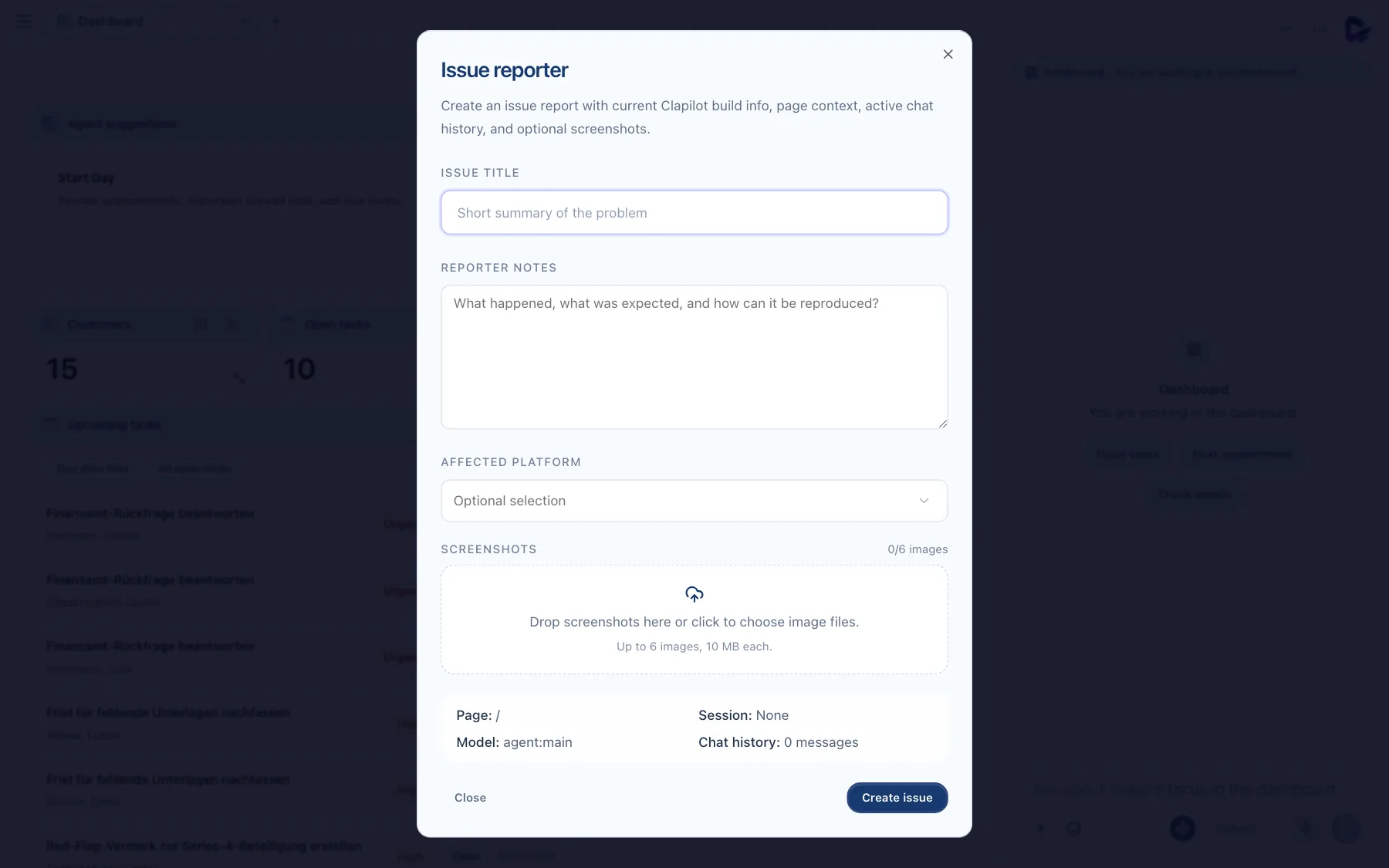
- Issue title – a short summary, for example “Attachment won't open”.
- Reporter notes – what happened, what you expected and how to reproduce it. Below that, you choose the Affected platform: web, iOS, Mac or all of them.
- Screenshots – up to six images of up to 10 MB each, by drag and drop or by clicking.
- Create issue – sends the report. Depending on the setup, it becomes a task in Clapilot or an entry for the Clapilot team.
Frequently asked questions
Can my team see my emails? No. Your mailbox, calendar, notes, your chats with the agent and the agent's personal memories about you are personal. Your team shares contacts, documents, tasks, the wiki, automations and Team Chat channels.
Does the agent send anything without my knowledge? No. The agent only sends emails, faxes and letters, publishes content, places orders and deletes data after your approval – unless you have explicitly pre-approved an action for a specific automation.
Why is the agent called “Angela”? That's its name in new instances. Your administrators can change it under Settings → Admin → Agent.
How do I change the language? Under Settings → Profile in Language. The agent replies in the language you write to it in.
Where do I find a deleted email? In the Trash folder of your mailbox (folder selection at the top left in Emails).
Can I use Clapilot on my smartphone? Yes, in the browser, with its own smartphone view. There are also native Clapilot apps for iPhone, iPad and Mac – ask your administrators for access.
When something doesn't work
| What you see | What you can do |
|---|---|
| “No personal email account connected” | Connect your mailbox under Settings → App Connections (Getting started). |
| “Mailbox connection failed” | Check your credentials under App Connections. Many providers require an app password for IMAP. For Microsoft 365 and Google, disconnect once and sign in again. |
| The agent doesn't reply or reports an error | Wait a moment and send again. If the error persists, your administrators check under Settings → ClapilotAICore whether an AI provider is connected. |
| “Reply failed” for a reply draft | Try again in the email's workflow area. You can always write the reply yourself with Reply. |
| A module is missing from the menu | It is not installed or is hidden from the menu. Admins install modules in the Store. You can check your own menu settings under Settings → Profile → Customize menu. |
| A page stays empty or doesn't load | Reload the page. If that doesn't help, report the problem with the Issue Reporter – it includes the technical details automatically. |
| A document shows no AI analysis | Large uploads are analyzed one after another; you see the progress on the left in Documents under Status. If needed, ask the agent: “Analyze the document … again.” |
More documentation
The technical documentation describes architecture, operations, interfaces and modules for administrators and developers.